Microsoft may have ditched its streaming music ambitions, but the Groove Music app continues to receive updates and is better than ever. Use it to create your own music streaming service.
The future of music is streaming and people are buying music less and less. CD sales are still popular, but for the price of one CD a month you could stream all the music you want with a choice of millions of tracks. Physically buying music does not make a lot of sense to many people.
Of course there will always be niche markets in music and some people still swear by vinyl LPs as the best way to listen to music, but for most of us, streaming is best.
What do you do with your vast music CD collection though? If you have a computer with a CD player it is possible to copy the music from the disc to the disk. In other words, put it on the computer in a digital audio file format like WAV, MP3, M4A, OGG and so on. A utility like CDex will copy CDs to disk, but iTunes can be used too.
Music purchased online and downloaded to the computer will also be one of those formats too.
Although Microsoft has given up on its paid streaming music service, the Groove Music app in Windows 10 still makes a great music player for music on your computer or online. It has recently been updated with new features and is now better than ever.
Upload your music to OneDrive
The Groove Music app scans the Music folder on the computer and the Music folder on OneDrive for compatible music file formats. It then builds your music library from the files and folders found. Create a folder for each artist and a subfolder for each album. Put the tracks in each album folder.
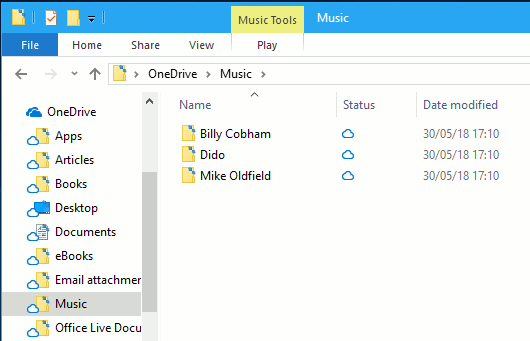
Your music library can be stored on the PC’s disk drive or it can be stored online. Putting it in OneDrive gives you both options.
See those cloud icons against everything? On this computer the music is stored online, not on the computer, but they still play in Groove Music. They stream from OneDrive online storage.
To store your music online:
- Open an Explorer window
- Right click the OneDrive folder and select Settings
- Select the Settings tab
- Tick the checkbox under Files on Demand > Save space and download files as you use them
- Right click OneDrive again and select Clear space
- It takes a few minutes, but files on the PC are removed, leaving a copy on OneDrive
Configure Groove Music settings
Click the gear icon at the bottom of the sidebar to open Settings:

Music on this PC: Click the link to choose which folders are scanned for music. It includes the obvious places by default, but you can add other folders to the list.
Media Info: Turn on this switch and Groove Music automatically gets album and artist artwork for the tracks you store on the disk or on OneDrive. Be patient because it is slow. It could take an hour if there are a lot of albums recently added. Just let the app run and the artwork appears sooner or later. Playing an album or track tends to nudge it to get the artwork.
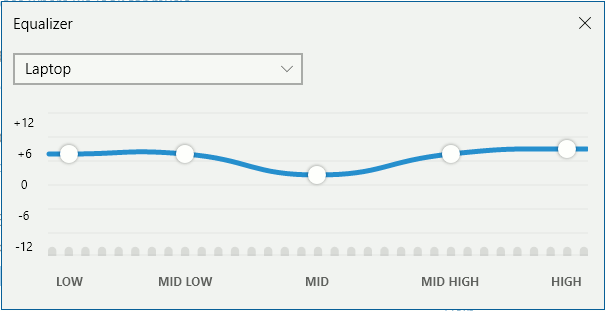
NEW! Playback: Groove Music now includes an equalizer for adjusting the quality of the audio. Click the link and this panel opens. Select one of the preset configurations, such as Laptop, Treble Boost, Bass Boost, Headphones, Portable Speakers and so on. Each of the five white circles can be dragged up and down to create your own custom sound.
OneDrive: Manage my OneDrive Music. This opens a web browser window to show the music folder on OneDrive. It is easier to use Explorer to move files around, but if you are on a work PC or a friend’s PC, you can access OneDrive in a browser to manage your music.
NEW! Display artist art: This can be found further down the settings and it is brilliant! As music plays, artist artwork is set as the desktop background and the lock screen background. When you play a track from a different artist, the desktop and lock screen also change. (I also selected the Dark theme for this screenshot.)
Music continues to play when the PC is locked and it is useful to create a playlist, set it playing and then lock the PC by pressing Windows+L. The artwork displays on the screen and changes with the music.
Use the mini player
When playing music in Groove, there is a little rectangular icon at the right side of the play control bar. Click it and Groove Music shrinks to this mini player. Here is my Windows desktop with the mini player and artist artwork showing:
Groove is a great player
For people that want to create their own music libraries and not pay for streaming, Groove Music is a nice little app. You can store your music on the PC’s disk or online in OneDrive and when it is online, it can be played on any computer or device.
Groove Music app is available on Windows 10 PCs, Android phones and tablets, and iPhone and iPad. They all stream music stored online in OneDrive.

See the ONEDRIVE label on the right of each track? This means it is stored online and is being streamed.
If you have music CDs, why not put them on OneDrive? You will need more than the free 5 GB provided, but even 1 TB is less than the price of a streaming music service. It’s worth considering.
Be the first to comment